Preparing Proxmox for TrueNAS
Introduction
This page walks through setting up networking in preparation for TrueNAS.
Prerequisites
Your setup before is expected to be:
- The machine is physically connected to some form of upstream internet;
- The only network bridge that currently exists is the default
vmbr0.
Steps
Creating the inter-VM network bridge
To allow virtual machines to communicate safely, we will be creating a new bridge vmbr1. VMs that require direct communication with each other with no additional routing in between them will use this bridge to talk to each other.
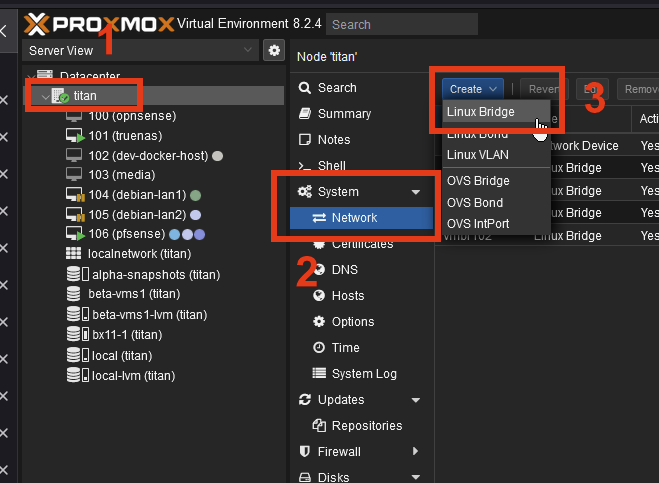
- Select your Proxmox node.
- Go to System > Network
- Click Create > Linux Bridge:

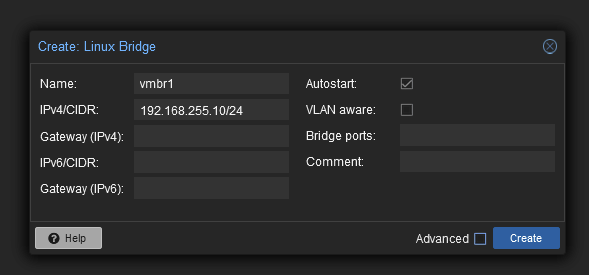
- A popup should appear. Fill it out like so:

The IPv4 we set here is the address at which the Proxmox node itself will be reachable on this bridge. If left empty, it will not be reachable by VMs. - Click Create.
-
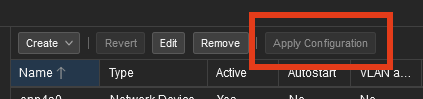
Apply the changes:

The inter-VM network bridge is now created, and Proxmox itself is reachable on the bridge via the address 192.168.255.10.
You are now ready to install TrueNAS.